Building a Reactive Android App using Agera
- 5 minsOriginally published on 28th Sept, 2017 on Medium

The hardest part of learning react programming is thinking in Reactive — Andrea Staltz
Thinking Reactive
If you are a beginner this is how things are probably are for you now, if you have a button or any event source, you use listeners(Receivers) which monitors(Observes) for when the event happens, and execute (Update) whatever you intended. The terms in bracket are the alternatives Agera uses for handling event sources.
Events are typically an asynchronous stream on which you can observe and execute tasks based on it. But in react you can create streams not just from events like clicks or hovers they can be from variables, user inputs, api data — anything that has data.
Streams can be used as input to another stream, multiple streams can be merged into one, or filtered to get a particular stream or even map data values from one stream to another.
Streams are sequence of ongoing events ordered in time that is being observed. It can emit three different things: a value (of some type), an error, or a “completed” signal. We capture these emitted events only asynchronously, by defining a function that will execute when a value is emitted, another function when an error is emitted, and another function when ‘completed’ is emitted.
Why Agera?
Agera uses the well-known observer pattern as the driving mechanism behind its reactive programming paradigm. Observables take Updatables and signal change via update() calls. It is then the responsibility of those Updatables to figure out what changed. This is practically a zero argument reactive dataflow which relies on side-effects per update(). Agera uses fours interfaces at it’s foundation
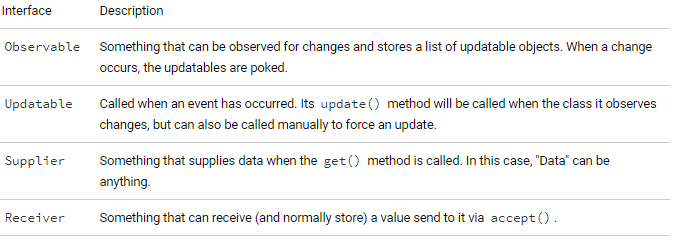
But it’s most important concept is the Repository — Repositories receive, supply and store data and emit data. They foundation interfaces are combined into a Repository.
Repositories could either be: 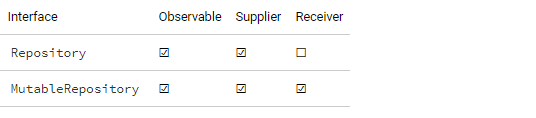
- Static repository supply the same value and don’t generate any events;
- The mutable repository that allows changing its value and generates events whenever the value is being updated to a different one (according to Object.equals(Object)).
Hold on before you fall away with all the concepts, we’ll soon put it to practise. In this app we will be using a complex mutable repository to build a calculator app that can react to changes without any jankiness on the UI. It’s not called complex because it’s hard to implement but because it can react to other repositories (or observables, in general) and produce values by transforming data obtained from other data sources, synchronously or asynchronously.
Simple Calculator app with most of the concepts
You will need an have an introductory knowledge of lambdas to flow along with some part of this example.
First Steps — Add the dependency
// Agera depencies
compile 'com.google.android.agera:agera:1.3.0'
Enable Java 8 features on android
android {
  ...
  defaultConfig {
    ...
    jackOptions {
      enabled true
    }
  }
  compileOptions {
    sourceCompatibility JavaVersion.VERSION_1_8
    targetCompatibility JavaVersion.VERSION_1_8
  }
}
Creating the UI 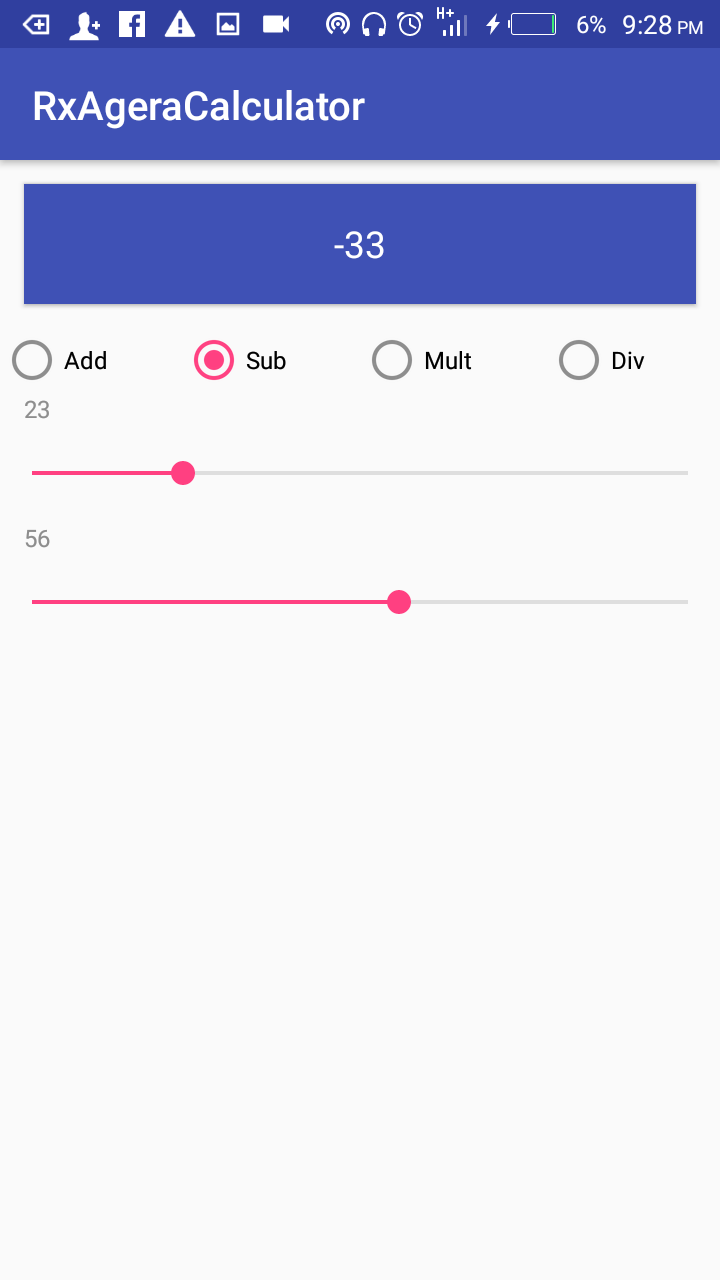
Link to github for UI code
We will need four Repositories on all the event sources and four Updatables
//    Repository for storing the first value to be calculated
private MutableRepository<Integer> mValue1Repo = Repositories.mutableRepository(0);
//    Repository for storing the second value to be calculated
private MutableRepository<Integer> mValue2Repo = Repositories.mutableRepository(0);
//    Repository for storing the result to be calculated
private Repository<Result<String>> mResultRepository;
// Repository for storing the operation to be performed
private MutableRepository<Result<Integer>> mOperationSelector =
        Repositories.mutableRepository(Result.absent());


// Updateables that will be called when the repository values //changes ie when an event has occured
private Updatable mValue1TVupdatable;
private Updatable mValue2TVupdatable;
private Updatable mResultUpdatable;
Setup the Radio Button to notify the repository that it has been clicked
// set the radio button to notify the repositories when changed
public void onRadioButtonClicked(View view) {
    mOperationSelector.accept(Result.present(view.getId()));
}
Setup event sources to work with our repository
// set the event sources to work with their repository
((SeekBar) findViewById(R.id.seekBar1)).setOnSeekBarChangeListener(
        new RepositorySeekBarListener(mValue1Repo));

((SeekBar) findViewById(R.id.seekBar2)).setOnSeekBarChangeListener(
        new RepositorySeekBarListener(mValue2Repo));
The result repository is a complex repository that observes other repositories so we take so extra care to make sure it works.
//the result repository is a complex repository so taking so extra care to make sure it works well
mResultRepository = Repositories.repositoryWithInitialValue(Result.<String>absent())
        .observe(mValue1Repo, mValue2Repo, mOperationSelector)
// observes for when the repository changes
        .onUpdatesPerLoop()
// updates after all tasks in the queue has been executed
        .goTo(CalculatorExecutor.EXECUTOR)
// go to Executor for managing multiple threads
        .attemptTransform(CalculatorOperations::keepCpuBusy).orEnd(Result::failure)
// data processing flow provides failure-aware directives that allow                                                                                               // terminating the flow in case of failure
        .getFrom(mValue1Repo)
// obtain values for processing
        .mergeIn(mValue2Repo, Pair::create)
// merge value from first and second repo and create a pair
        .attemptMergeIn(mOperationSelector, CalculatorOperations::attemptOperation)
// try to perform calculator operation of add, subtract,                                                                                                       // multiply or divide
        .orEnd(Result::failure)
        .thenTransform(input -> Result.present(input.toString())) // transform calculated result to be presented
        .onConcurrentUpdate(RepositoryConfig.SEND_INTERRUPT)
        .compile();
Initialise the Update to update the textviews from values in the repository
// initialise the Updater to update the textviews from values from the repository always
mValue1TVupdatable = () -> ((TextView) findViewById(R.id.value1)).setText(
        mValue1Repo.get().toString());

mValue2TVupdatable = () -> ((TextView) findViewById(R.id.value2)).setText(
        mValue2Repo.get().toString());

// initialise the Updater for the resulttextview to check for errors and set textview correctly
TextView resultTextView = (TextView) findViewById(R.id.textViewResult);
mResultUpdatable = () -> mResultRepository
        .get()
        .ifFailedSendTo(t -> Toast.makeText(this, t.getLocalizedMessage(),
                Toast.LENGTH_SHORT).show())
        .ifFailedSendTo(t -> {
            if (t instanceof ArithmeticException) {
                resultTextView.setText("DIV#0");
            } else {
                resultTextView.setText("N/A");
            }
        })
        .ifSucceededSendTo(resultTextView::setText);
Register the repository in the onStart() method and calling update on the Updateables.
//add updateables to the repository
mValue1Repo.addUpdatable(mValue1TVupdatable);
mValue2Repo.addUpdatable(mValue2TVupdatable);
mResultRepository.addUpdatable(mResultUpdatable);

// call update on the when the event repository is observing for // // changes
mValue1TVupdatable.update();
mValue2TVupdatable.update();
mResultUpdatable.update();
Remove the Updateable in onStop()
mValue1Repo.removeUpdatable(mValue1TVupdatable);
mValue2Repo.removeUpdatable(mValue2TVupdatable);
mResultRepository.removeUpdatable(mResultUpdatable);
Now what ever happens to your event sources, you’ve correctly set up Agera repositories to react to it without any jankiness to the UI. You can even drag the two seekbars at the same time with no jank.
Get the complete code on github